


Common Website Issues for Real Estate Agents (and How to Fix Them)
A real estate website is supposed to be a powerful tool for attracting and converting potential clients. But in 2026, many real estate agents still lose leads because their site loads slowly, hides contact information, or makes property listings hard to use on mobile devices. These problems don’t just hurt user experience. They also weaken search engine visibility, reduce time on site, increase bounce rates, and quietly damage lead generation.
This guide explains the most common website issues for real estate agents, why they cause lead generation leaks, and how to fix them using practical, proven steps. It also includes IDX-specific guidance, SEO best practices, and a checklist designed to help an optimized real estate website perform better in search engine results pages and convert more real estate leads.
Table of Contents
Featured snippet answer
Are common website issues for real estate agents fixable?
Yes. Most common website issues for real estate agents are fixable, including slow loading times, poor mobile-friendly design, confusing navigation, weak SEO, outdated listing pages, and missing contact information. Fixing these website mistakes improves user experience, boosts search engine optimization, and stops losing leads by making it easier for potential clients to find listings, trust the agent, and contact them.


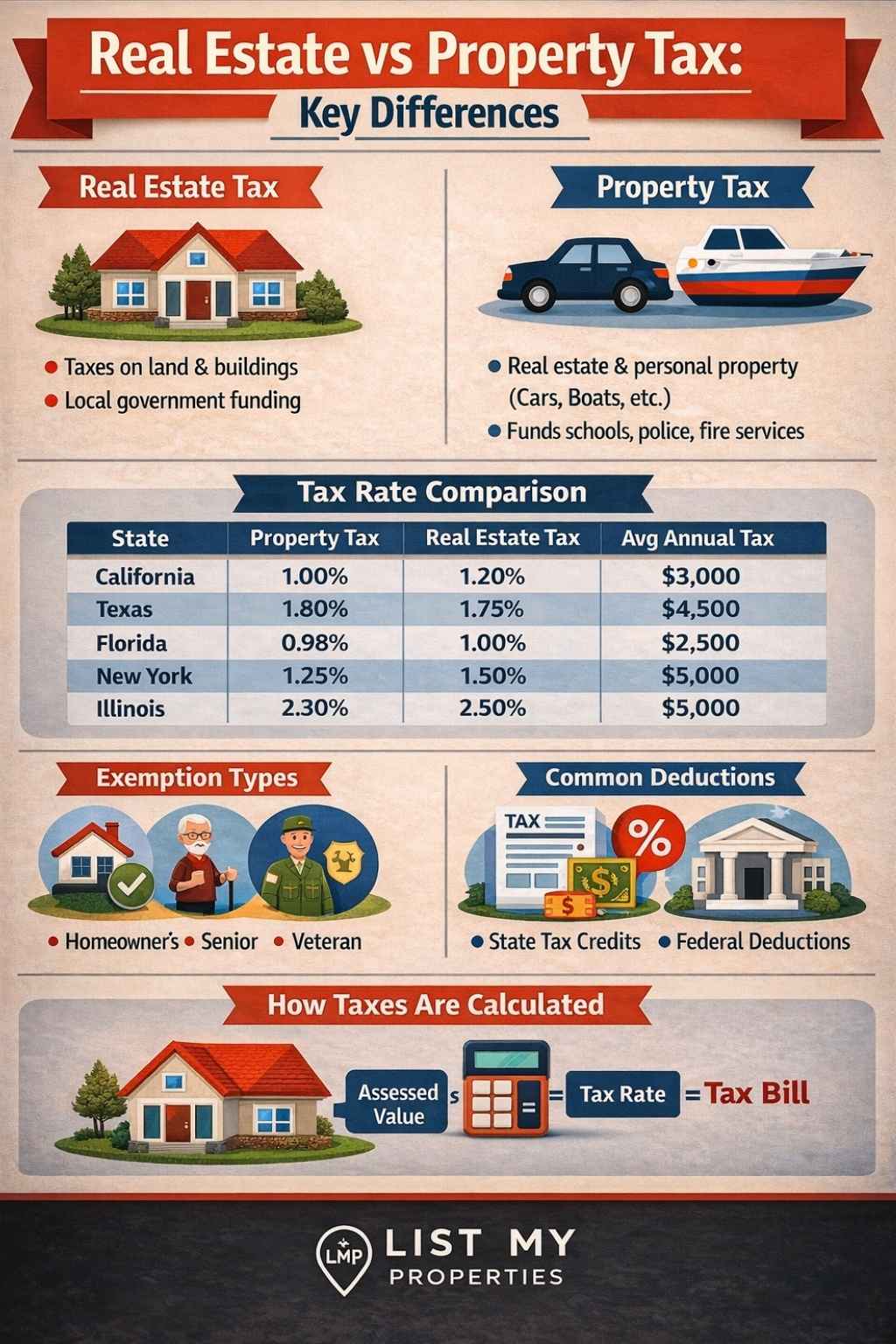
Property Tax vs Real Estate Tax: Are Real Estate Taxes the Same as Property Taxes?

Why these issues matter more in 2026
Real estate is a mobile-first industry. NAR’s 2025 Profile of Home Buyers and Sellers reports that 70% of buyers relied on a mobile or tablet device in their search.
That means a real estate website that isn’t mobile-friendly, fast, and easy to navigate will push potential clients away at the exact moment they are comparing agents and listings.
Add to that Google’s ongoing focus on page experience and Core Web Vitals (LCP, INP, CLS), and the result is simple: technical issues can quietly reduce both rankings and conversions.
The 5 most common website mistakes real estate agents make (and what they break)
This section uses the keyword cluster language on purpose because it matches how people search: website mistakes, real estate website mistakes, mistakes real estate agents make, and the 5 common website mistakes pattern that ranks frequently.
1) Not mobile-friendly (the biggest reason for losing leads)
When a real estate agent website isn’t mobile-friendly, the user experience breaks instantly: buttons are too small, listing filters are hard to tap, forms are annoying, and the phone number isn’t clickable. That’s one of the most common website issues for real estate agents losing leads because mobile users have low patience and high intent.
Many real estate agents make this mistake because they build a site on desktop first, then “hope it works” on smartphones and tablets. But mobile devices to browse the internet are the default for home search.
What to fix first
Make sure your website uses responsive website design, readable font sizes, thumb-friendly buttons, and fast-loading property listings. Run PageSpeed tools and a mobile UX check before adding more blog content. Google also documents mobile friendliness as part of page experience.
2) Slow loading times (high bounce rates, fewer leads)
Loading times are a lead generation killer. If a listing page takes too long, potential clients won’t wait, and bounce rates climb. Several competitor articles call out speed, but few explain what to do in order.
A clean fix order that works
Compress high-quality images and videos (especially hero banners and listing galleries)
Remove heavy sliders and unnecessary scripts
Enable caching and a CDN
Reduce third-party widgets (chat, popups, map embeds)
Check the biggest pages: home page, IDX search, top neighborhood pages
Core Web Vitals are the practical way to connect speed with search engine performance. Google recommends achieving good Core Web Vitals and explains how they relate to search results and user experience.
3) Poor navigation (users can’t find what they’re looking for)
If visitors can’t easily navigate your site, they leave. This is one of the most common real estate website mistakes because the menu is built around the agent, not the visitor. A user-friendly website should help people find property listings, local market pages, and contact information in seconds.
A simple navigation structure that converts
Home
Search (IDX)
Featured listing pages (buy/rent/new construction)
Communities / neighborhoods
About the real estate agent (trust)
Contact (prominently displayed)
Sierra Interactive emphasizes user-friendly navigation and quick access to property listings and contact information as key conversion drivers for an IDX real estate website.
4) Ignoring SEO best practices (rank lower in search engine results)
Many agents build a beautiful website that search engine crawlers can’t understand. That causes poor visibility in search engine results pages and reduces inbound real estate leads.
Common SEO problems that show up repeatedly
weak keyword targeting (no clear keyword per page)
duplicate MLS descriptions (thin content)
missing internal links between neighborhoods and listings
missing meta titles/descriptions
no original content that proves local expertise
Competitor guides repeatedly mention SEO and mobile design as foundational fixes.
Practical SEO workflow (doesn’t require daily blogging)
Choose one primary keyword per page (city + property type + intent)
Add 2–3 supporting sections per page: schools, commute, pricing snapshot, buyer tips
Build internal links from blog content to community pages and IDX search
Use original content for local market authority (not copied MLS text)
5) Weak calls-to-action and missing contact information
This is the “silent leak.” The website may get traffic, but lead generation fails because the visitor doesn’t know what to do next, or can’t find contact information fast. Sierra’s checklist calls out the importance of making contact details easy to find and adding simple contact forms.
What a conversion-ready contact setup looks like
phone number in header (tap-to-call)
short contact form on every major page
“schedule a showing” CTA on listing templates
“get new listings” email capture (signing up for a newsletter)
quick trust signals: reviews, service areas, recent sales (if allowed)
IDX-specific issues (why IDX helps, and how it can hurt if misused)
IDX (Internet Data Exchange) connects an MLS database and a website so visitors can search listings without leaving the agent website. myRealPage explains that IDX search keeps visitors on your website longer and increases odds they become a lead.
Realtyna defines IDX as the rules and technology that allow MLS listings to be displayed publicly on agent sites.
Common IDX website issues that hurt SEO and lead generation
IDX pages that load slowly (filters + map + photos)
thin listing pages with duplicate descriptions
too many near-identical URL variations (crawl bloat)
IDX search hidden instead of prominently placed
weak internal linking from community pages into IDX results
Best practices for IDX + SEO together
Create “community pages” (neighborhood guides) as the primary SEO pages
Link each community page to an IDX results page for that area
Keep IDX templates lightweight (fewer scripts, optimized images)
Use analytics to measure IDX search usage, scroll depth, and form submissions
Table: website issues, symptoms, impact, and fixes (2026-ready)
| Website issue | What it looks like | Impact on leads | Fix (priority order) | Tool to verify |
|---|---|---|---|---|
| Not mobile-friendly | tiny buttons, broken layout | losing leads fast on mobile | responsive design, simplify templates | Google Page Experience guidance |
| Slow loading times | listing pages lag | bounce rates rise | compress images, reduce scripts, caching/CDN | Core Web Vitals docs |
| Confusing navigation | users can’t find listings | shorter sessions | simplify menu, “within 3 clicks” | behavior tracking (analytics) |
| Weak SEO | pages don’t rank | fewer organic leads | keyword mapping + internal links | Search Console + sitemap process |
| Missing contact info | no clear CTA | traffic doesn’t convert | prominent phone/email + forms | CTA testing (A/B tests) |
| Intrusive interstitials | popups block content | frustration + drops | remove or delay popups on mobile | Google intrusive interstitial docs |
| Outdated content | old listings, stale pages | trust drops | update regularly + publish local market posts | “fresh content” guidance |

How Long Does It Take to Get a Real Estate License? 2026 Career Guide

Can a Property Owner Block an Easement? Legal Rights, Remedies & State Laws Explained

AI Overviews section
Real estate tax and competition are high, so a real estate website must be fast, mobile-friendly, and easy to navigate to avoid losing leads. The most common website issues for real estate agents include slow loading times, weak SEO, confusing navigation, poor IDX setup, missing contact information, and intrusive popups that damage user experience. Fixing these website mistakes improves search engine optimization, supports better performance in search engine results pages, and increases lead generation by making property listings easier to browse and contact options easier to use. In 2026, Core Web Vitals and page experience standards also matter, especially because most buyers search on mobile devices.
Trustworthy external references (for credibility)
These sources support the technical SEO + UX claims and improve trust:
Google on INP replacing FID (Core Web Vitals responsiveness)
NAR 2025 Profile: 70% used mobile/tablet in home search
Conclusion
A real estate website isn’t just a digital brochure. It’s the front door for potential clients, listings, and lead generation. When mobile-friendly design, loading times, IDX search, and SEO best practices are handled correctly, the site becomes a consistent source of quality leads instead of a place where leads quietly disappear.
FAQ
What are common website issues for real estate agents?
The most common include slow loading times, poor mobile-friendly design, confusing navigation, weak SEO, weak IDX setup, and missing contact information.
What is IDX and why is it important for my real estate website?
IDX lets an agent website display MLS listings and keep visitors searching on-site, which increases the chance they become a lead.
How can I improve my real estate website’s mobile optimization?
Use responsive design, simplify templates, improve speed, and avoid intrusive interstitials that block content on mobile.
How do I generate more leads from my real estate website?
Make CTAs prominent, improve user experience, speed up listing pages, strengthen SEO, and track conversions in analytics.
Why is my real estate website underperforming?
Most underperformance comes from technical issues (speed, mobile), SEO gaps, and conversion leaks (hidden CTAs, weak forms, unclear next steps).


Join The Discussion